Watch the quick tutorial below to see how easy how it is!
Friday, May 29, 2020
Newspapers.com
Did you know that you can save clippings you find on Newspapers.com directly to your personal Ancestry Family Tree? Even if you're accessing Newspapers.com through the Glenview Library, it's easy to save and attach your research to your Tree.
Watch the quick tutorial below to see how easy how it is!
Watch the quick tutorial below to see how easy how it is!


Monday, May 25, 2020
Veterans Oral History Project
In 2009, students from Glenbrook South assisted Glenview Library staff by interviewing twenty-one veterans who served in conflicts ranging from WWII to the Vietnam War. These oral histories are available for viewing on our YouTube page.
As we stay in to celebrate this Memorial Day, take a moment to honor some of the men and women who have served our country.
As we stay in to celebrate this Memorial Day, take a moment to honor some of the men and women who have served our country.
Friday, May 22, 2020
Memorial Pages on Fold3

Create a Memorial Page on Fold3 as a genealogy project for Memorial Day.
Under "Memorials" search the Honor Roll for all veterans included in the Fold3 database or search the interactive Vietnam War and Pearl Harbor Memorials. Add photographs, stories, or leave a tribute on a veteran's page. You can also create a Memorial page for service members who are not already listed in the database.

Use Fold3 to search for military records and histories to add your veteran's story. Access Fold3 from home with your Glenview Library Card.
Wednesday, May 20, 2020
Six Census Tips
Census records contain many rewarding family details and are often some of the first documents a genealogist uses when they're getting started with family history. Here are six tips to make sure that you're getting the most out of these valuable records.
1. Examine Everyone on the Census Record
Don't just focus on the family you've found in a census record. Look at the entire census image and don't forget to look at the pages following and preceding the original image. When you examine neighboring households, you're likely to find your ancestors' relatives. Families frequently lived near each other and people often married their neighbors.
2. Search Using First Names Only
Family names often changed once a family immigrated to the US. Names were also frequently misspelled or recorded wrong by census takers. If you're having trouble finding a family in the census, leave the last name off the search form completely and try searching only with the household's first names.
3. Reverse the First and Last Names
If you're still not finding your family, try reversing the first and last names. This is another common census taker mistake!
4. Research the Neighbors
Try searching for neighbors when you're can't find your family in a census year. For example, if you found the family in 1900 but can't find them in 1910, go to the 1900 census and record the names of their nearest neighbors (preferably the nearest homeowners--not renters). Now search for those neighbors in 1910. Once you've found them, see if your ancestors are still living nearby.
5. Browse the Entire Community
When you've tried everything else, try browsing. Choose the census year and then the location where your ancestors lived. Next browse the census pages and look for their names.
6. Record Every Detail
There are so many details in census records! Remember to record all of them. Some of this information will help in your search for other records but other details just complete your family's story. Census records tell you more than ages and marital status but these documents also answer the questions: Do they own or rent their home? What's their address? What languages do they speak? Are they literate? Who is their employer? Are they a veteran?
1. Examine Everyone on the Census Record
Don't just focus on the family you've found in a census record. Look at the entire census image and don't forget to look at the pages following and preceding the original image. When you examine neighboring households, you're likely to find your ancestors' relatives. Families frequently lived near each other and people often married their neighbors.
2. Search Using First Names Only
Family names often changed once a family immigrated to the US. Names were also frequently misspelled or recorded wrong by census takers. If you're having trouble finding a family in the census, leave the last name off the search form completely and try searching only with the household's first names.
3. Reverse the First and Last Names
If you're still not finding your family, try reversing the first and last names. This is another common census taker mistake!
4. Research the Neighbors
Try searching for neighbors when you're can't find your family in a census year. For example, if you found the family in 1900 but can't find them in 1910, go to the 1900 census and record the names of their nearest neighbors (preferably the nearest homeowners--not renters). Now search for those neighbors in 1910. Once you've found them, see if your ancestors are still living nearby.
5. Browse the Entire Community
When you've tried everything else, try browsing. Choose the census year and then the location where your ancestors lived. Next browse the census pages and look for their names.
6. Record Every Detail
There are so many details in census records! Remember to record all of them. Some of this information will help in your search for other records but other details just complete your family's story. Census records tell you more than ages and marital status but these documents also answer the questions: Do they own or rent their home? What's their address? What languages do they speak? Are they literate? Who is their employer? Are they a veteran?
Friday, May 15, 2020
Genealogy eBooks
Find genealogy reference guides and books on in our eBook collection on Hoopla. Access Hoopla from the the Library's Downloads page or use the Hoopla app on your mobile device.
Search for "genealogy" to find books on everything from beginning genealogy to how-to guides on more advanced and specific topics. This collection also includes family histories and genealogy memoirs that may inspire you to write your own story.

Search for "genealogy" to find books on everything from beginning genealogy to how-to guides on more advanced and specific topics. This collection also includes family histories and genealogy memoirs that may inspire you to write your own story.

Tuesday, May 12, 2020
Exploring Ancestry Part 2
Here are even more tips to help you with your Ancestry searches:
1. Advanced Search
 On the Basic Search page, click on "Show More Options" to bring up your Advanced Search selections. From here, you can add life events or family members to your search.

2. Using Search Filters
Use filters on your search times to refine or broaden your results. Name filters can search for the exact name you searched or for variations on that name. Use "Sounds like" to find names that sound the same but have different spellings or choose "Similar" to find names that have similar meanings such as known nicknames or the same name in another language. Filters can also be used on locations and date ranges.

3. Filtering Search Results
Use the filtering options on the left side of your search results. Narrow results down by record type, location or date.

 4. Wildcards
For names that have common variations or are often misspelled, add wildcards in your search. Replace letters with a question mark or an asterisk. ? replaces a single letter and * replaces multiple letters. For example, Mari?n would match for both Marian and Marion. A search for Mari* would find Maria, Marie, Marian, Marianne, Marion, and others.

5. Find New and Recently Updated Collections
In the card catalog, go to "Sort By" and then select "Date Added" to see the newest record collections or select "Date Updated" to see which collections added new records. If you visit Ancestry a lot, this is how to find the newest records that you may not have searched yet.

1. Advanced Search
 On the Basic Search page, click on "Show More Options" to bring up your Advanced Search selections. From here, you can add life events or family members to your search.
Use filters on your search times to refine or broaden your results. Name filters can search for the exact name you searched or for variations on that name. Use "Sounds like" to find names that sound the same but have different spellings or choose "Similar" to find names that have similar meanings such as known nicknames or the same name in another language. Filters can also be used on locations and date ranges.

3. Filtering Search Results
Use the filtering options on the left side of your search results. Narrow results down by record type, location or date.


For names that have common variations or are often misspelled, add wildcards in your search. Replace letters with a question mark or an asterisk. ? replaces a single letter and * replaces multiple letters. For example, Mari?n would match for both Marian and Marion. A search for Mari* would find Maria, Marie, Marian, Marianne, Marion, and others.

5. Find New and Recently Updated Collections
In the card catalog, go to "Sort By" and then select "Date Added" to see the newest record collections or select "Date Updated" to see which collections added new records. If you visit Ancestry a lot, this is how to find the newest records that you may not have searched yet.

Thursday, May 7, 2020
Celebrate Mother's Day with Family History
 Family holidays are always a good time to think about our personal histories. For Mother's Day,
 consider asking your mother questions about her life. The responses can help you craft a written family history and enrich your genealogy research. Or record your own memories of your mother or what motherhood has meant to you. These make excellent stories to share with children and grandchildren.
Here are some writing prompts taken from FamilySearch's #52stories project to get you started:
- How has your mother or being a mother enriched your life?
- What lessons have you learned from your grandmothers’ life experiences?
- What are some of the stories you loved hearing from your mother’s youth? From your grandmothers’ younger days?
- What is the best thing about your relationship with your mother or grandmother?
- Who are some important mother figures besides your own mother who have been influential in your life?
Tuesday, May 5, 2020
Exploring Ancestry.com Part 1
Here are some activities to get you familiar with Ancestry.com.
1. Create Your Family Tree
Record everything you already know about your ancestors. Write this down on a Family Group Sheet or a Pedigree Chart. Or create free online family trees on Ancestry.com or MyHeritage.
2. Basic Search
On Ancestry.com, go to "Search -- All Categories" to begin your basic search. Search for an
ancestor. Include the name, estimated birth date and a location where you ancestor lived.

3. Explore by Location
From the main search page, scroll down to: "Explore by Location." Click on a location on the map or choose a location from the list below. See what record collections Ancestry has for where your ancestors lived.

4. Specific Search Pages
Under the "Search" tab, select a search page for a specific record type. Search for your ancestors in Census Records; Birth, Marriage & Death Records; Military Records; or Immigration & Travel Records.

5. Card Catalog
Select "Card Catalog" on the Search tab. Find all of Ancestry's record collections here. Search for a record collection by keyword such as "Chicago" or "World War I." Or filter by collection type, location or date.

1. Create Your Family Tree
Record everything you already know about your ancestors. Write this down on a Family Group Sheet or a Pedigree Chart. Or create free online family trees on Ancestry.com or MyHeritage.
2. Basic Search
On Ancestry.com, go to "Search -- All Categories" to begin your basic search. Search for an
ancestor. Include the name, estimated birth date and a location where you ancestor lived.

3. Explore by Location
From the main search page, scroll down to: "Explore by Location." Click on a location on the map or choose a location from the list below. See what record collections Ancestry has for where your ancestors lived.

4. Specific Search Pages
Under the "Search" tab, select a search page for a specific record type. Search for your ancestors in Census Records; Birth, Marriage & Death Records; Military Records; or Immigration & Travel Records.

5. Card Catalog
Select "Card Catalog" on the Search tab. Find all of Ancestry's record collections here. Search for a record collection by keyword such as "Chicago" or "World War I." Or filter by collection type, location or date.

Friday, May 1, 2020
The Great Courses: Discovering Your Roots

With your Glenview Library card, you have access to The Great Courses series through kanopy.
The Great Courses includes a 15 episode series on genealogy. The episodes include lessons in interviewing your relatives, researching online and in libraries or archives, finding different record types, writing your family history and there's even a course on planning a research trip abroad.
Find kanopy and all of our streaming services on our Downloads page.
Wednesday, April 29, 2020
Ancestry Library Edition
The world's most popular genealogy database is temporarily accessible from home with your Glenview Library Card. Find everything you need to get started on your family history. Look for your ancestors in census and immigration records or search for birth, marriage and death documents.
To access Ancestry from home, go to the Glenview Public Library website.
Click on "Research 24/7" and then on "Genealogy."
On our Genealogy Resources Page, you'll find all of our Ancestry and all of our genealogy databases. You will need your Glenview Library Card number to login.

To access Ancestry from home, go to the Glenview Public Library website.
Click on "Research 24/7" and then on "Genealogy."
On our Genealogy Resources Page, you'll find all of our Ancestry and all of our genealogy databases. You will need your Glenview Library Card number to login.

Monday, April 27, 2020
Adding Branches To Your Family Tree Using DNA
Keep up-to-date with the latest trends in genealogy and technology by watching some of the archived 2020 RootsTech sessions at rootstech.org.
In the above video, genealogist Angie Bush explains how to use your DNA results to grow your family tree. It's a nice introduction to genetic genealogy and Bush gives some great examples on how DNA can help break down your brick walls.
Wednesday, December 11, 2019
Fold3

The Glenview Public Library now has access to the military records database Fold3!
Search for:
- Documents from military conflicts ranging from the Revolutionary War to the Vietnam War
- Draft records
- Enlistment records
- Muster rolls
- Pension records
- Casualties and death files
- Photographs, war diaries, and military newspapers
If you have an Ancestry.com account, you can save records from Fold3 directly to your Ancestry Family Tree.
Access Fold3 at the library or from home using your Glenview Public Library card.
Wednesday, October 2, 2019
Family History Memoirs
October is Family History Month! Celebrate by reading a family history memoir!


The Yellow House by Sarah Broom
In 1961, Sarah Broom's mother Ivory Mae bought a shotgun house in the then-promising neighborhood of New Orleans East and built her world inside of it. This is a memoir of place which also traces a century of the author's family history and the impact of class, race and Hurricane Katrina on her sense of identity.
All You Can Ever Know: A Memoir by Nicole Chung
From early childhood, Nicole Chung heard the story of her adoption as a comforting, prepackaged myth but as she grew up, she wondered if the story she’d been told was the whole truth. Chung tells of her search for the Korean parents who gave her up and offers a moving chronicle of surprising connections and the repercussions of unearthing painful family secrets
The Girl from Human Street: Ghosts of Memory in a Jewish Family by Roger Cohen
Beginning in the nineteenth century, Roger Cohen tracks his family’s story of repeated upheaval. As he follows them across continents and decades, valued heritage and evolving loyalties converge into a resonant portrait of cultural identity in the modern age. It is a tale of otherness marked by overt and latent anti-Semitism but also otherness as a sense of inheritance.
Not My Father's Son: A Memoir by Alan Cumming
When Alan Cumming agreed to appear on Who Do You Think You Are?, he hoped to solve the mystery of his maternal grandfather's disappearance. But just before filming, Alan's father, whom Alan had not seen or spoken to for more than a decade, revealed that he had a secret to share, one that would set into motion a journey that would change Alan's life forever.
White Like Her: My Family's Story of Race and Racial Passing by Gail Lukasik
After learning her mother's life-changing secret, Gail Lukasik embarks on a quest to uncover her mother’s racial lineage, tracing her family back to eighteenth-century Louisiana. Lukasik also explores her African-American mother’s decision to pass, how she hid her secret even from her own husband, and the price she paid for choosing whiteness.
Annie's Ghosts: A Journey into a Family Secret by Steve Luxenberg
Approaching her 80th birthday, Steve Luxenberg's mother told a doctor that she had a disabled sister but everyone had always thought she was an only child. Mystified, Luxenberg follows the history of his mother's family trying to answer the question: If his mom had a sibling, why had her existence been concealed for decades?
On Gold Mountain: The One-Hundred-Year Odyssey of My Chinese-American Family by Lisa See
As a girl, Lisa See would listen to her grand-mother and great-aunt's colorful stories about their family's past. With these stories and her own years of research, See chronicles the odyssey of her Chinese-American family, a history that encompasses racism, romance, secret marriages, entrepreneurial genius, and much more, as two distinctly different cultures meet in a new world.
Inheritance: A Memoir of Genealogy, Paternity, and Love by Dani Shapiro
After submitting her DNA to a genealogy site, Dani Shapiro received the stunning news that her father was not her biological father. Shapiro examines the extraordinary moment we live in in which science and technology have outpaced not only medical ethics but also the capacities of the human heart to contend with the consequences of what we discover.


The Yellow House by Sarah Broom
In 1961, Sarah Broom's mother Ivory Mae bought a shotgun house in the then-promising neighborhood of New Orleans East and built her world inside of it. This is a memoir of place which also traces a century of the author's family history and the impact of class, race and Hurricane Katrina on her sense of identity.
All You Can Ever Know: A Memoir by Nicole Chung
From early childhood, Nicole Chung heard the story of her adoption as a comforting, prepackaged myth but as she grew up, she wondered if the story she’d been told was the whole truth. Chung tells of her search for the Korean parents who gave her up and offers a moving chronicle of surprising connections and the repercussions of unearthing painful family secrets
The Girl from Human Street: Ghosts of Memory in a Jewish Family by Roger Cohen
Beginning in the nineteenth century, Roger Cohen tracks his family’s story of repeated upheaval. As he follows them across continents and decades, valued heritage and evolving loyalties converge into a resonant portrait of cultural identity in the modern age. It is a tale of otherness marked by overt and latent anti-Semitism but also otherness as a sense of inheritance.
Not My Father's Son: A Memoir by Alan Cumming
When Alan Cumming agreed to appear on Who Do You Think You Are?, he hoped to solve the mystery of his maternal grandfather's disappearance. But just before filming, Alan's father, whom Alan had not seen or spoken to for more than a decade, revealed that he had a secret to share, one that would set into motion a journey that would change Alan's life forever.
White Like Her: My Family's Story of Race and Racial Passing by Gail Lukasik
After learning her mother's life-changing secret, Gail Lukasik embarks on a quest to uncover her mother’s racial lineage, tracing her family back to eighteenth-century Louisiana. Lukasik also explores her African-American mother’s decision to pass, how she hid her secret even from her own husband, and the price she paid for choosing whiteness.
Annie's Ghosts: A Journey into a Family Secret by Steve Luxenberg
Approaching her 80th birthday, Steve Luxenberg's mother told a doctor that she had a disabled sister but everyone had always thought she was an only child. Mystified, Luxenberg follows the history of his mother's family trying to answer the question: If his mom had a sibling, why had her existence been concealed for decades?
On Gold Mountain: The One-Hundred-Year Odyssey of My Chinese-American Family by Lisa See
As a girl, Lisa See would listen to her grand-mother and great-aunt's colorful stories about their family's past. With these stories and her own years of research, See chronicles the odyssey of her Chinese-American family, a history that encompasses racism, romance, secret marriages, entrepreneurial genius, and much more, as two distinctly different cultures meet in a new world.
Inheritance: A Memoir of Genealogy, Paternity, and Love by Dani Shapiro
After submitting her DNA to a genealogy site, Dani Shapiro received the stunning news that her father was not her biological father. Shapiro examines the extraordinary moment we live in in which science and technology have outpaced not only medical ethics but also the capacities of the human heart to contend with the consequences of what we discover.
Wednesday, September 18, 2019
Cook County Vital Records on FamilySearch
Did you know that you can find images of Cook County vital records on FamilySearch? They can be tricky to find but you don't have to pay for them!
Note that you can only view these images at a FamilySearch Affiliate Library so you'll be able to view these at the Glenview Public Library but not at home.
Start by searching for the record you need.


Next, open a new tab and go to the FamilySearch Catalog. Under "Search for" click on "Film/Fiche Number" and type in the GS Film Number you just wrote down and hit search.


Note that you can only view these images at a FamilySearch Affiliate Library so you'll be able to view these at the Glenview Public Library but not at home.
Start by searching for the record you need.

Find and select the record you want to view.

After you've selected the record and verified it's the one you want, look on the right under "Document Information." You may have to click the down arrow for the information to show.

Write down the GS Film Number and the Image Number.
Next, open a new tab and go to the FamilySearch Catalog. Under "Search for" click on "Film/Fiche Number" and type in the GS Film Number you just wrote down and hit search.

This will bring up the Cook County collection you want. Click on the title.

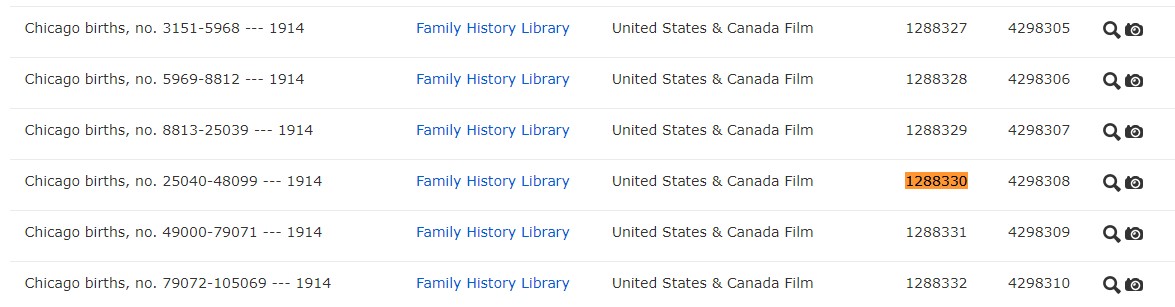
Scroll down on the next page for the films. Find the GS Film number in the list. This is the film you want. Click on the camera icon to view images.
Now you'll see a page of image thumbnails. In the upper left corner, find the box that says "Image."

Type the Image Number you recorded earlier in the box and hit "Enter" on your keyboard.

This will highlight one of the thumbnails. Double click on the image and you have your certificate!
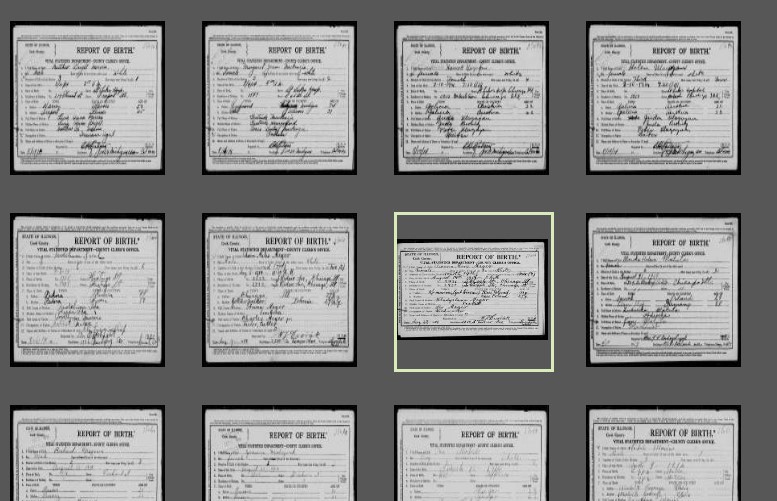

And you didn't have to pay Cook County for it!
Tuesday, September 10, 2019
Digging Deeper with Ancestry.com
You know the basics of Ancestry.com but want to learn more? Join us this Thursday at 2 PM for our class: Digging Deeper with Ancestry.com Explore Ancestry’s special collections and learn advanced search techniques.
Register online or call the Reference Desk at 847-729-7500.
Register online or call the Reference Desk at 847-729-7500.
Thursday, August 22, 2019
Chicago & Cook County Genealogy
Join us Tuesday, August 27 at 2 PM for a class on Chicago & Cook County Genealogy Records. Find your Chicago ancestors with us!
Register online or call the Reference Desk at 847-729-7500.
Register online or call the Reference Desk at 847-729-7500.
Tuesday, August 13, 2019
Helpful Books for Polish Genealogy

If you're looking for more Polish genealogy guidance, here are some recommended books that can help with your research.
Going Home: A Guide to Polish-American Family History Research
Polish Roots
Polish Surnames: Origins & Meanings
Following the Paper Trail: A Multilingual Translation Guide
In Their Words: A Genealogist's Translation Guide to Polish, German, Latin, and Russian Documents
A Translation Guide to 19th-Century Polish-Language Civil-Registration Documents
Polish Customs, Traditions and Folklore
Forgotten Doors: The Other Ports of Entry to the United States
Tuesday, August 6, 2019
Polish Genealogy: 4 Steps to Success
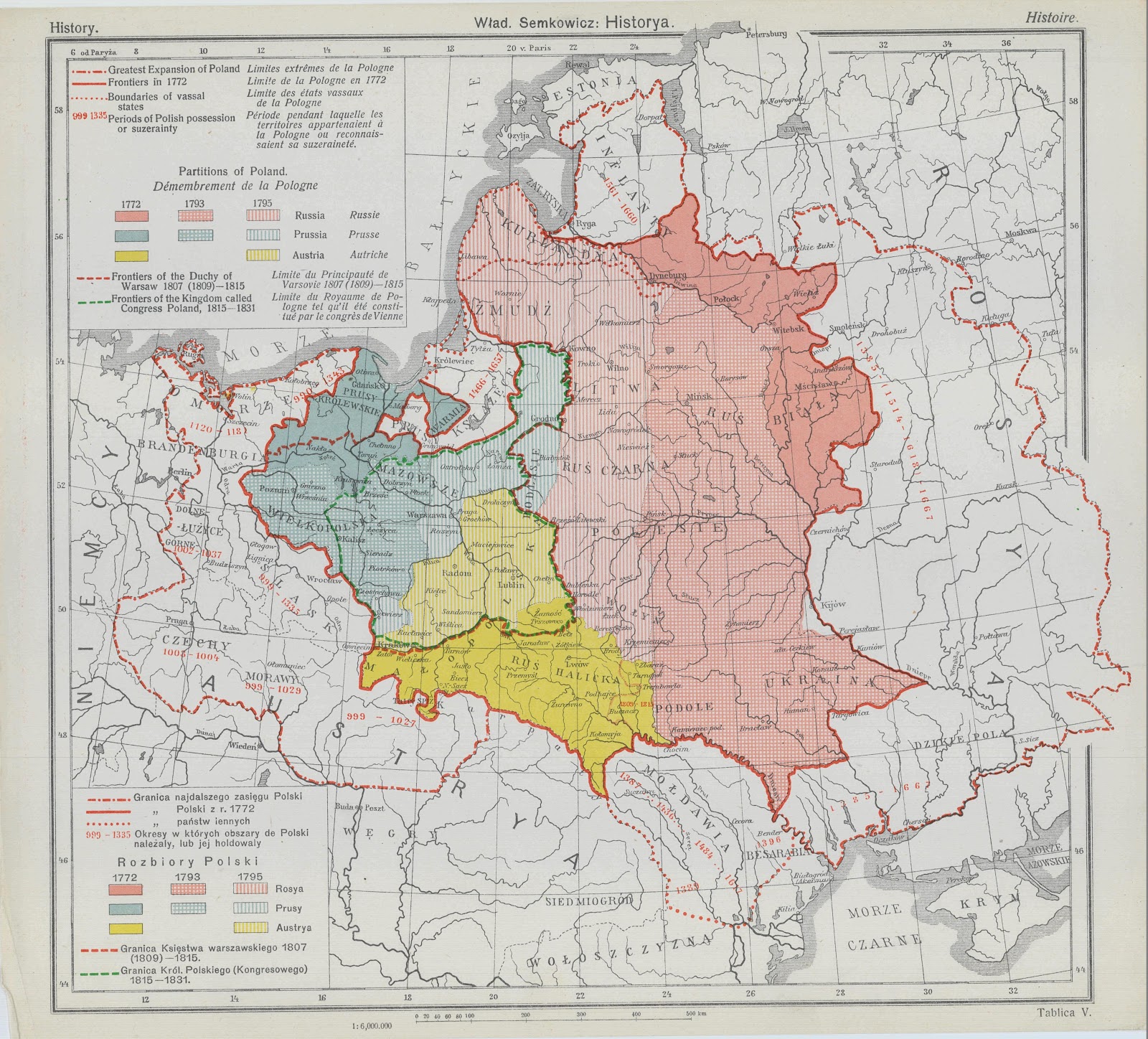
We'll cover logical steps on searching and translating Polish documents as well as what to do about border changes that confuse us on where our ancestors were born. . This material will jump start your research and help you enjoy your Polish Heritage.
This presentation is presented in partnership with the North Suburban Genealogical Society.
Wednesday, July 31, 2019
Ancestry Holocaust Records
Today Ancestry announced a new partnership with the Arolsen Archives (formerly the International Tracing Service or ITS). The Arolsen Archives contains the most comprehensive archive of material related to victims and survivors of Nazi persecution. Many of these documents will be made available on Ancestry.com.
Two collections from Arolsen are already online and accessible from Ancestry:
Europe, Registration of Foreigners and German Persecutees, 1939-1947

This collection includes information gathered by the Allies at the end of the war concerning those who had been persecuted in Germany by public institutions, social securities and companies. The documents may contain death and burial information.
Africa, Asia and Europe, Passenger Lists of Displaced Persons, 1946-1971

The majority of the immigrants in this collection are Holocaust survivors or refugees leaving Germany and other European ports. These records were created by the International Refugee Organization (IRO) and the Intergovernmental Committee on European Migration.
Two collections from Arolsen are already online and accessible from Ancestry:
Europe, Registration of Foreigners and German Persecutees, 1939-1947

This collection includes information gathered by the Allies at the end of the war concerning those who had been persecuted in Germany by public institutions, social securities and companies. The documents may contain death and burial information.
Africa, Asia and Europe, Passenger Lists of Displaced Persons, 1946-1971

The majority of the immigrants in this collection are Holocaust survivors or refugees leaving Germany and other European ports. These records were created by the International Refugee Organization (IRO) and the Intergovernmental Committee on European Migration.
Thursday, July 18, 2019
Daughters of the American Revolution

We keep old issues of the Daughters of the American Revolution Magazine in the Lundberg Collection. Most of our issues date from the '60s and '70s but we do have some dating back to 1929!
These issues have valuable service information about Revolutionary War soldiers and histories from the Colonial Era. They also contain genealogical sources submitted by DAR members which include Bible records, grave transcriptions, wills, and general family histories.


Subscribe to:
Posts (Atom)